
Listen at120 fps.
cloudrs is a native, open source SoundCloud client for your desktop. No Electron, no webview: drawn on the GPU with GPUI, decoded in Rust.
press play·112 BPM·A minor · live synth·Space
Side A · Highlights
Eight tracks.
No filler.
Everything cloudrs is about, pressed onto one side. Hover a row to hear it in your head, open it for the liner notes.
01Native, for realRust · GPUI · Zed's UI engineGPU02:14
No browser inside. The window is drawn on the GPU with GPUI, the framework behind the Zed editor, under its own title bar with the logo. It opens instantly and answers every click at 120 fps.
02A Home that knows the scenetrending by genre · curated rowsHome03:35
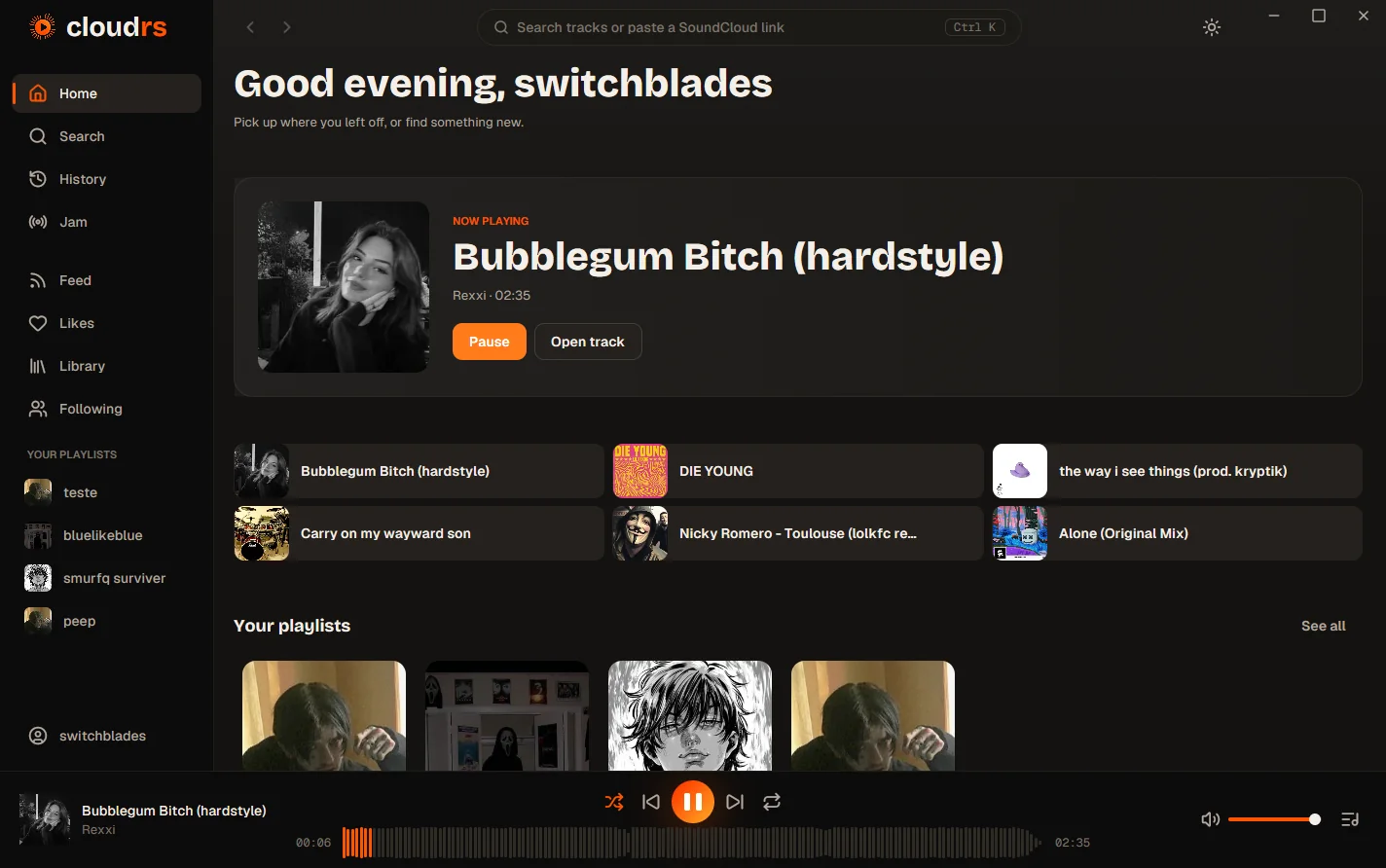
A greeting for the time of day, what is playing, quick tiles, trending tracks by genre, SoundCloud's own curated rows and charts. Sign in with your SoundCloud account and your playlists, feed, likes and artists join them.
03Jam, listen togethera link · peer-to-peer · no serverNew05:20
Start a Jam, share the link, and friends on any network hear the same moment you do. Guests add tracks, and with your permission play, pause and skip. Only the state travels, peer to peer; there is no cloudrs server in the middle. More below ↓
04Playlists of your owncover · tags · drag to reorderCreate04:06
Create playlists with a cover, a description, a genre and tags, public or private. Add from any track, drag to reorder, rename or delete. They live on your SoundCloud account, so they follow you everywhere.
05The waveform is the seek barhover · preview · jumpSeek03:47
Hover the waveform and the bars up to your pointer light up with where you'll land. Click to jump. (Try the player at the bottom of this page.)
06Discord Rich Presencelistening to · cover · progressDiscord01:31
Your Discord status shows what you are listening to, with the cover, a progress bar and buttons to open the track.
07A real queuedrag · play next · undo shuffleAutoplay05:01
Drag to reorder, play next, shuffle that you can take back, repeat, and endless autoplay from related tracks. Close it mid-song: the queue, the position and the volume come back next time.
08Keyboard firstCtrl K · Alt ← → · paste a linkKeys04:44
CtrlK or / to search, Alt←→ to go back and forward, and paste any SoundCloud link or Jam invite into search to open it. The full set of shortcuts, Space included, comes with M4.
The app
Quiet chrome.
Loud music.
Warm neutrals step back so artwork and waveforms carry the color. Real screenshots of the 0.1 beta, with its own title bar.
<0MB
RAM while playing, the target
0fps
for every hover, click and scroll
0
Electron, webviews or cloudrs servers
0OS
Linux, macOS and Windows
New Jam
Same song.
Same second.
No server.
Start a Jam, share a link, and your friends' players follow yours, from any network. Peers connect directly over iroh. Only the state travels between you; every player streams its own audio from SoundCloud.
- 1Host a Jam. Your player becomes the authority: track, position, play and pause.
- 2Share the link. Friends paste it anywhere in cloudrs to join.
- 3Stay in sync. Clock offset and drift correction keep everyone on the beat.
cloudrs://jam/example- 4–9 ms to connect, direct
- 0.000 s idle CPU in 30 s
- ~27 B/s per guest
Architecture
A clean signal chain.
A Rust workspace patched like a modular rack: every crate is one module with one job, cables only run one way, and the tests fail if anyone patches around them.
Desktop app
Screens, i18n, composition root
Design system
Tokens, theme, motion, primitives
State & commands
Queue, events, persistence, cache
OS integration
Keychain, sign-in, media keys
SoundCloud client
Models, auth, pagination
Audio engine
HLS → symphonia → cpal
Jam peer-to-peer
iroh, protocol v1
sc-api and sc-audio never talk to each other · audio never waits on the UI or the network
Keyboard first
Your hands stay home.
Go on, press them. They light up here too.
Search everythingor /, from any screen
Back and forwardthrough every screen you opened
Paste a link, open ita SoundCloud URL or a Jam invite, in search
Play, pauseon this page today; in the app with M4
Roadmap
Now playing: M4.
Built in the open, one milestone at a time. The playhead is where we are.
- M0SpikeWorkspace, CI, search, HLS playback, first GPUI window
- M1Playable MVPSearch, play, waveform player, paste a link
- M2NavigationTrack, profile and playlist screens, full queue, history
- M3Your accountSign in, likes, library, feed, following
- M4DesktopMedia keys, shortcuts, audio devices, timed comments
- M50.1 releaseGapless, EQ, mini player, packages, translations
Get started
Install it,
or build it.
Or build it yourself: Stable Rust is all you need. On Linux, install the audio and windowing packages listed in the README first.
# clone it
$ git clone https://github.com/pablozr/cloudrs
$ cd cloudrs

# run the desktop app
$ cargo run -p cloudrs
cloudrs presents
Open
Source
an early, open lineup · featuring you on
- AudioHLS, gapless, seeking with symphonia & cpal
- PlatformMPRIS, Now Playing, SMTC, packaging
- TranslationsEnglish first, built for every language
- DesignComponents on the visual identity
MIT · small commits · English · doors open now